

Description
Lightweight Kanban Tool for Agile Teams
Overview
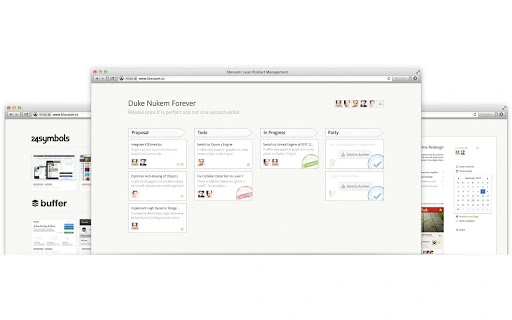
Blossom is a lightweight project management tool designed for teams building mobile and web applications. It functions as a virtual Kanban board, organizing work through cards that represent tasks or features. The software emphasizes transparency by showing team members who is working on what, the progression of features from idea to delivery, and whether the team is overcommitted. This focus on workflow visibility supports agile and lean startup principles, making it ideal for teams that prioritize rapid iteration and frequent releases. The tool is particularly suited for small to mid-sized development teams seeking a simple yet effective way to manage work without the complexity of heavier project management platforms. Its minimalistic design allows for quick onboarding and immediate use, reducing setup time and cognitive load. Real-world applications include sprint planning, backlog grooming, and daily stand-up coordination. The developer did not provide additional details about the origin or background of the tool, nor specific use cases beyond software development workflows. However, its core functionality aligns with modern agile practices and supports continuous delivery cycles.
Key Features & Capabilities
- Kanban Board Interface – A visual board with customizable columns and draggable cards representing tasks or features. This allows teams to track work stages from idea to completion.
- Real-Time Task Visibility – Shows who is assigned to each task and the current status of work in progress, improving team alignment and accountability.
- Workload Insights – Provides a high-level view of team capacity, helping identify overcommitment and bottlenecks in the delivery pipeline.
- Agile & Lean Startup Alignment – Built around principles of early shipping and iterative improvement, supporting fast feedback loops and continuous delivery.
- Simple Task Management – Enables teams to create, assign, and update tasks with minimal friction, ideal for fast-moving environments.
Each card can represent a feature, user story, or bug, and can be moved across columns such as “To Do,” “In Progress,” and “Done.” This visual workflow supports sprint tracking and helps teams maintain focus on deliverables. The tool is designed for teams that value simplicity and speed, avoiding unnecessary complexity. Its lightweight nature ensures it can be used without significant overhead, making it suitable for remote and distributed teams. The developer did not specify additional integrations or automation features, so functionality remains focused on core task tracking and visualization.
User Interface, Workflow & Performance
The user interface is minimalistic, centered around a clean Kanban board layout with intuitive drag-and-drop interactions. Navigation is straightforward, allowing users to switch between boards, manage columns, and update task details with few clicks. The workflow is optimized for speed, enabling team members to quickly add tasks, assign them, and update their status during stand-ups or planning sessions. The software’s lightweight design contributes to efficient performance, though exact resource usage details were not specified. Performance observations are based on general software behavior patterns, suggesting smooth operation even on modest hardware. Stability appears to be a focus, as the tool is designed for continuous use in fast-paced environments. The developer did not provide information on CPU or RAM consumption, nor on responsiveness under heavy workloads. However, the absence of complex features implies a low system footprint, which is beneficial for users working on older or less powerful machines.
Compatibility & System Requirements
Blossom is compatible with both Windows and Mac operating systems, making it accessible to a broad range of users across different platforms. The software has a file size of 50 MB, indicating a compact installation that requires minimal disk space. The version is 1.0.0, suggesting a stable initial release with foundational features. Exact system requirements were not listed, so users should ensure their devices meet general desktop application standards. Compatibility information was partially provided, and the developer did not specify minimum hardware specifications such as RAM or processor type. Installation is straightforward, though detailed setup instructions were not included in the available information. Users should expect a standard desktop app installation process, typical for cross-platform tools.
Pros and Cons
Pros
- Lightweight and fast-loading interface
- Simple, intuitive Kanban board layout
- Supports agile and lean startup methodologies
- Real-time visibility into team workload and task progress
- Free to use with no licensing barriers
Cons
- Limited system requirements information
- No details on integrations or automation features
- Basic feature set may not suit large or complex projects
- Developer background not disclosed
- Performance under heavy usage not documented
FAQ Section
Is Blossom available for Windows and Mac?
Yes, Blossom is compatible with both Windows and Mac operating systems.
Is the software free to use?
Yes, Blossom is available at no cost, with no trial period or subscription required.
Can I use Blossom offline?
The developer did not specify whether offline functionality is supported. It may require an internet connection for full operation.
How often are updates released?
Update frequency was not disclosed. Users should check the official source for the latest version.
What type of license does Blossom use?
License type information was not provided. The software is free to use, but the specific terms are not publicly documented.
Final Thoughts
Blossom offers a streamlined, no-frills approach to project management tailored for agile and lean development teams. Its lightweight design and Kanban-based interface make it ideal for teams that value speed, transparency, and simplicity. While the feature set is basic, it effectively supports core workflows such as task tracking, sprint planning, and workload monitoring. The absence of detailed system requirements or integration options is a limitation, but the tool’s minimal footprint and free access make it accessible to a wide audience. For small to mid-sized teams focused on rapid delivery and continuous improvement, Blossom provides a practical solution without unnecessary complexity. It stands out as a reliable desktop application for teams building mobile and web applications who want to stay lean and focused.
Download Blossom now
Guides & Tutorials for Blossom - Lean Product Management App for Chrome
How to install Blossom - Lean Product Management App for Chrome
- Click the Preview / Download button above.
- Once redirected, accept the terms and click Install.
- Wait for the Blossom - Lean Product Management App for Chrome download to finish on your device.
How to use Blossom - Lean Product Management App for Chrome
This software is primarily used for its core features described above. Open the app after installation to explore its capabilities.
User Reviews for Blossom - Lean Product Management App for Chrome 0
No reviews found





